


Whole plant
Overall shape, height, branching and growth habit.
Tropical vine producing nutritious, sweet tubers. Extremely heat tolerant. Grown from 'slips' (rooted stem cuttings). Very productive in warm climates.
Use this real-world photo as the main plant reference, then compare it with the botanical drawings below for leaf, flower and harvest details.

Use these windows as a public guide. Plotera can personalise tasks around your saved garden, location and planting dates.
| Climate | Sow | Transplant / Plant | Harvest |
|---|---|---|---|
| Tropical | Jan - Dec | Jan - Dec | Jan - Dec |
| Subtropical | Sep - Dec | Sep - Dec | Dec - Apr |
| Mediterranean | Sep - Nov | Sep - Nov | Dec - Mar |
| Temperate | Oct - Dec | Oct - Dec | Jan - Mar |
| Cool | Nov - Dec | Nov - Dec | Feb - Mar |
| Arid | Sep - Nov | Sep - Nov | Dec - Mar |
Compare the whole plant first, then check the leaf, flower and harvest detail to identify what Sweet Potato should look like as it grows.
Overall shape, height, branching and growth habit.

Leaf shape, edges, colour and vein pattern.
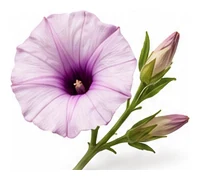
Flower colour, structure and where blooms appear.

Fruit, root, seed, pod or the strongest identifying feature.
A quick garden-to-table guide for using Sweet Potato after harvest.
Many roots are delicious raw when thinly sliced, grated, or cut into crunchy sticks.
Roast, bake, boil, mash, steam, pickle, or add to soups and tray bakes.
Pickle, ferment, cellar-store, or roast and freeze depending on the crop.
Try: Raw crunch, Roasted tray, Quick pickle, Soup or mash.
Corn, Beans, Marigold
Squash
Cure harvested tubers in warm, dry conditions for 10 days to improve flavour and skin.
Create a free account to save your garden layout, personal planting calendar, water and fertiliser schedules, seed inventory and harvest logs.
Create Free Account