
Always refining: a forest, mountains and weather around your 3D garden
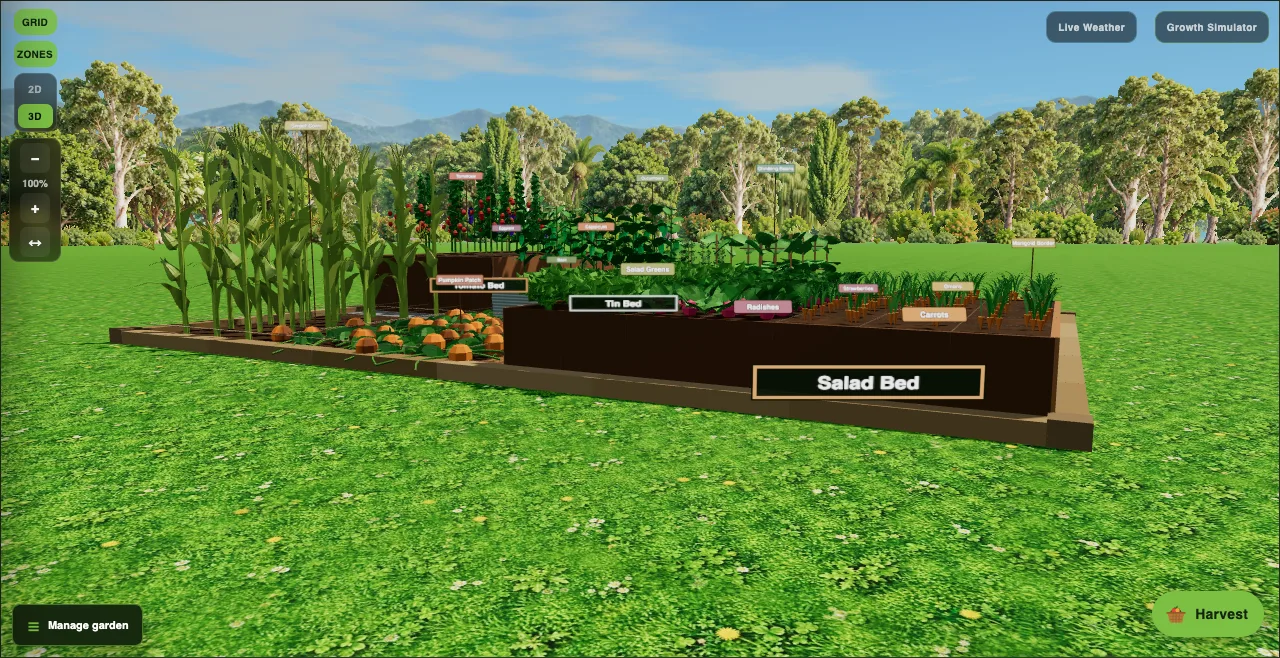
A garden app should feel like being in the garden. We are always refining how Plotera looks, and the 3D view has had its biggest visual update yet.
From an endless lawn to a clearing
Until recently, the 3D garden sat on grass that stretched to the horizon. Now it sits in a clearing: a ring of trees, a band of shrubs and wildflowers where the forest meets the lawn, and layered mountains in the distance. The trees suit your climate, with palms and gums in warm places and pines and birches where it is cooler.
We went through several versions to get here. The first used simple drawn trees; we replaced them with realistic cut-out trees, then reworked them again to remove pale edges, made the forest denser so no sky showed between the trunks, and brought it closer to the garden, while making sure no tree ever gets between you and your beds.
Scenery that follows the weather
With Live Weather on, the scenery changes with the real conditions where you are. Overcast days look soft and grey, sunsets glow warm, and at night the trees become dark silhouettes. Snow settles on the peaks, and on a windy day you will see swirls of air and the odd leaf blowing past.
Smooth on every phone
All of this is built to stay smooth. Plotera watches how well your phone is keeping up and quietly simplifies the scenery on older devices, without ever changing your garden itself.
We will keep refining. If something looks off on your device, let us know.