
Frost, heat and wind alerts for your garden
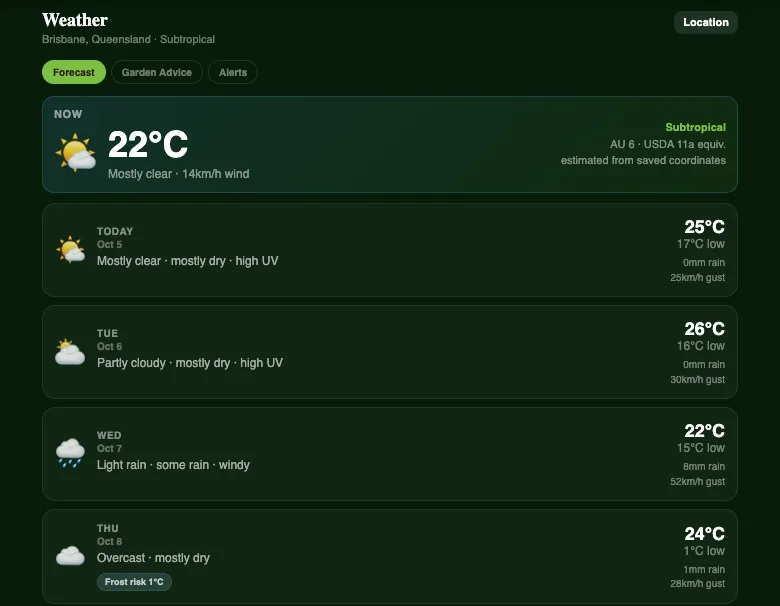
A single cold night can undo weeks of work. Plotera now keeps an eye on the forecast for your garden and tells you when to act.
Alerts that matter
- Frost: a warning when the forecast drops to 2°C or below, so you can cover seedlings and bring in pots.
- Heat: a warning when it climbs to 35°C or above, with a reminder to water deeply and shade tender crops.
- Wind: a warning when gusts reach about 45 km/h, so you can secure covers, trellises and seedling trays.
Alerts are tied to the real forecast window, so you hear about a frosty night ahead of time, not after it has happened, and you are not sent the same warning over and over.
A forecast built for gardeners
The Weather screen shows the week ahead with rain, UV and wind gusts for each day, plus your climate zone, worked out from your garden's saved location. Garden Advice turns the forecast into simple tasks, such as holding off watering before rain.
Alerts can arrive as notifications on your phone or by email, and you choose which ones you want in Settings.
Gardening somewhere frosty? Our guide to frost-hardy vegetables covers what to plant, and watering your garden covers heatwaves.