
Grow from seed with Plotera's new seedling trays
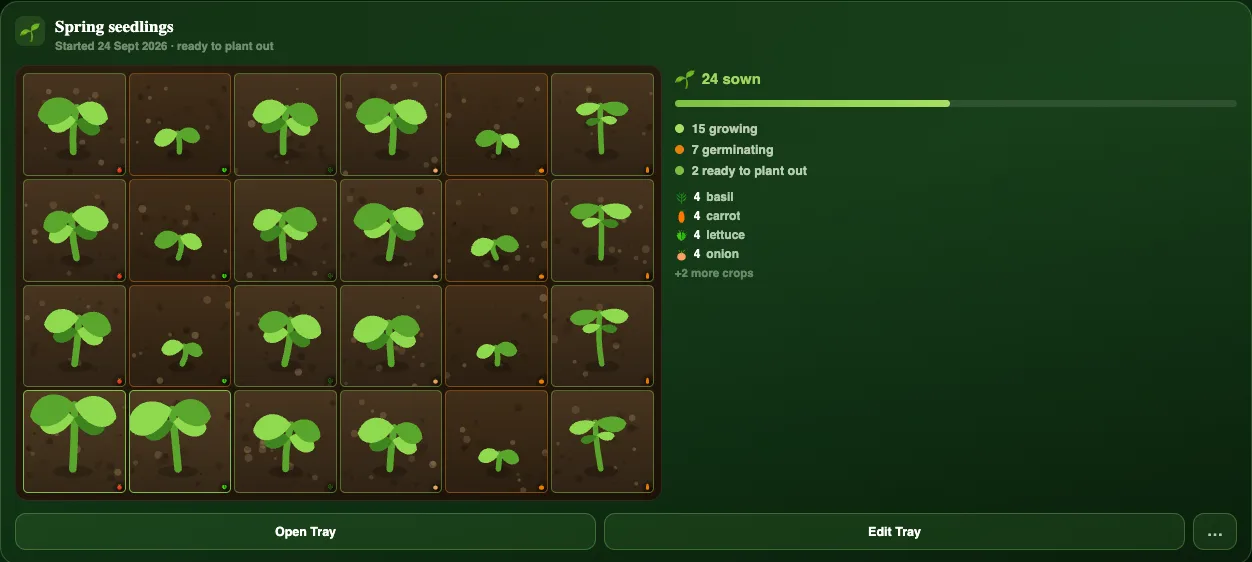
Most of the garden starts in a tray. The Nursery in Plotera now gives your seed trays the same care as your beds.
Every seedling on its own clock
Sow a cell and pick the plant, and Plotera uses that plant's real germination time to show how far along it is. Radishes race up in days; chillies take their time. Six days after sowing, a radish cell already looks like a sturdy seedling while a chilli is only just breaking through, because that is what happens in real life.
Every cell grows a little differently, with its own lean, height and leaf size, so a tray looks like real seedlings rather than a row of copies. The tray card also counts how many cells are sown, germinating, growing and ready to plant out.
Ready to plant out
When a seedling is ready, the tray tells you, so you can move it into a bed at the right time instead of leaving it to get leggy. Trays are easier to read at a glance, with clearer cards and labels.
One seed inventory
Your seed packets now show across every garden, not just the one you have open, so you can see everything you have before you buy more.
New to sowing? Our guide to sowing depth and germination covers how deep to plant and what to expect, and succession sowing explains how to keep the harvest coming.