
See your garden grow in 3D with the Growth Simulator
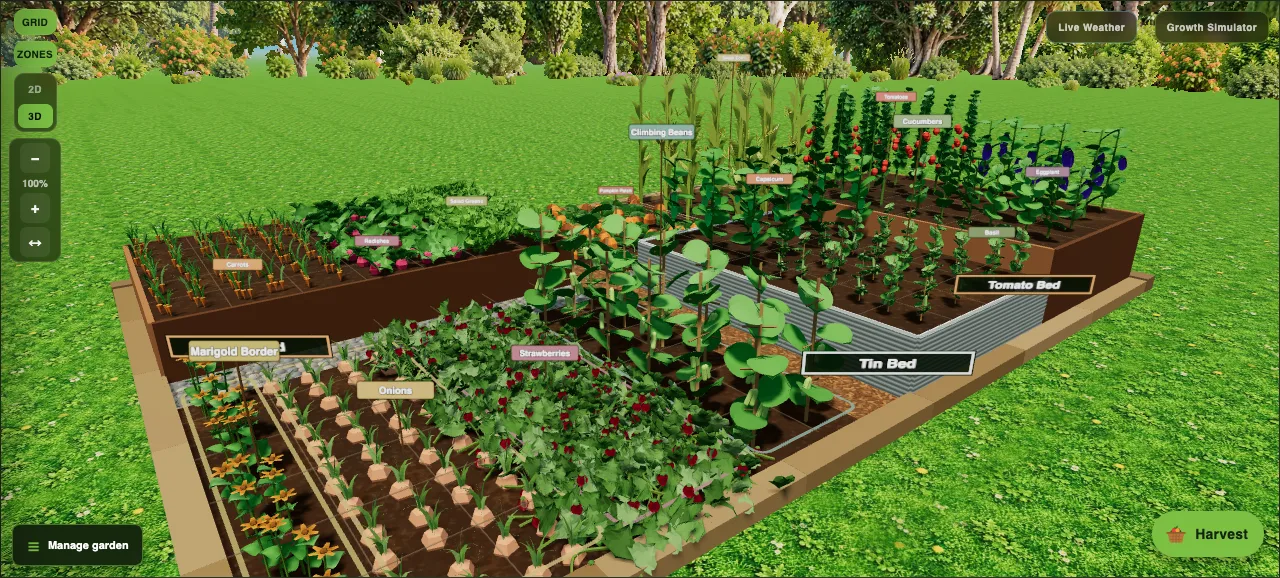
A flat plan tells you where things go. It does not tell you that the corn will shade the lettuce by midsummer, or that the pumpkins will swallow the path. That is what the 3D garden view is for.
Your garden, life-size
Switch any garden to 3D and every planting stands up at its real height, from low carrots and radishes to tall corn and climbing beans. Orbit around it, zoom in on a bed or tilt down to ground level. Raised beds are built to their real height too, in timber or corrugated tin, with a choice of galvanised, zinc, cream, heritage green, charcoal or manor red.
The Growth Simulator
Tap Growth Simulator and your garden shows each crop at its own stage, worked out from when you planted it and how long it takes to mature. A radish a few days from harvest looks nearly ready, while a watermelon sown last week is still a seedling.
Drag the slider to jump the whole garden forward to any stage, from just sown to harvest, and see how full each bed will get. It is the easiest way to check spacing before you plant.
Why it helps
- Spot tall crops that will shade shorter ones, and move them to the south side (or the north side in the northern hemisphere).
- See how much room sprawling crops like pumpkins and melons really need.
- Show the family what the garden will look like before anyone picks up a shovel.
For more on what to grow where, see our guides to companion planting and small-space gardening.